Posts

Making Sense of Office 365 Plans
Image
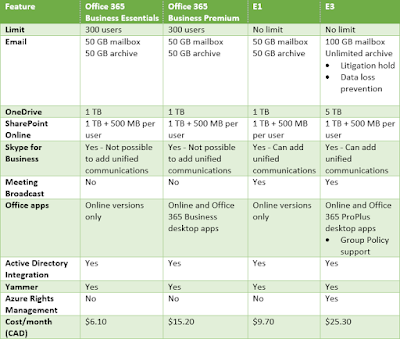
If you're just starting to look at Office 365 as a solution for your organization, the various plans can be overwhelming and confusing. I'm going to try and boil down all of the Office 365 plan information to just the essentials that allow you to make an informed decision. This is all based on research done March 2017 and the prices I include are Canadian dollars. You should verify that these features and prices are still correct for your scenario before making any decisions. I've includes some links at the bottom of this article to Microsoft documentation for you to verify. Microsoft should be keeping that content up to date. I'm going to focus on Office 365 plans for small business and enterprise. However, whether you are small business, non-profit, enterprise, or education, there are basically three generic Office 365 plans available: Office 365 desktop apps (Word, Excel, Outlook, etc) Cloud services (Exchange, Skype for Business, etc) Office 365 desktop apps and clo...
Exchange 2010 SP3 Hub Transport Upgrade Error

Image
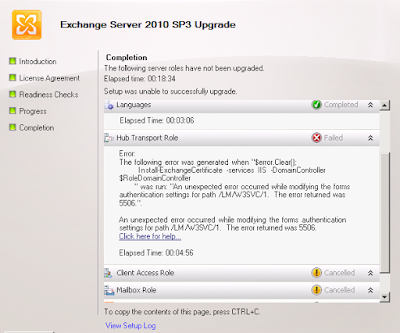
Ran into a new issue yesterday related to installing Exchange 2010 SP3. I was called in to help when the initial upgrade attempt failed. The error during SP3 installation was: An unexpected error occured while modifying the forms authentication settings for path /LM/W3SVC/1. The error returned was 5506. A screenshot of the error is below: Doing a search didn't come up with much, but it did give this: https://social.technet.microsoft.com/Forums/exchange/en-US/32df8c03-1957-4e8c-8381-4dc4cf26aee9/error-when-installing-exchange-server-2010?forum=exchangesvrgenerallegacy That link seemed to indicate that it could be related to the SSL binding on the default web site in IIS. Taking a look at the SSL binding, it seemed to be missing the certificate assignment. However, when I tried to add the certificate I got a strange error about the session be closed. Ok then, since you won't let me add the SSL certificate to the binding by using IIS Manager, let's try with Exchange Admin Cons...

So, You Wanna Be a Computer Geek?

I recently did a presentation for an Introduction to Management Information Systems class at the University of Manitoba Asper School of Business.  Students in this class are just starting to look at how IT and business are interrelated. One of the students asked me for advice on getting into the IT industry and this content grew out of that. I suppose the more polite way to phrase it would be: So, you'd like to work in the IT industry? Areas of IT One of the things that surprises many people looking at IT is that wide range of job roles. When you haven't been working in the industry, you tend to think that there is just the one role of computer geek. And your impression is likely that the computer geek does all computer related stuff including physically repairing computers. In actuality, there are multiple job roles in IT. And, the more you learn about IT, the more you realize that you understand only your little corner of the world. The more you learn, the more you realize ho...

Site Mailboxes Deprecated in SharePoint Online

Just saw a notification in my Office 365 portal that site mailboxes are being removed from SharePoint online. Existing site mailboxes will continue to function for now, but after March 2017 you cannot create new site mailboxes. It is recommended that you use Office 365 groups for collaboration instead. An Office 365 group behaves like a combination of a distribution group and shared mailbox combined with storage in SharePoint. It's a more complete collaboration solution, but you can use just the features that you want. In September 2017, a process will begin to transition site mailboxes to Office 365 groups. Here is a link with more info about Office 365 groups: https://go.microsoft.com/fwlink/?linkid=831908

Windows 2003 Documentation in PDF

Someone at Microsoft must have decided it was time to clean up the support documentation. You'll now find that if you try to use a link referring to older Windows Server 2003 documentation or support docs, you instead get prompted to download a PDF. At first I didn't think much about this as I didn't really need the documentation. Today I wanted to confirm some processes in a forest recovery (a low likelihood issue, but I'm doing up some documentation). Ok, I'll download this and find the content I want. It turns out that this PDF is 150MB and 28000 pages. I'm sure it's complete, but not very convenient. If anyone else is looking for the forest recovery info, it's on page 3078. I should also point out that this content is relevant all the way up to Windows Server 2012 R2 (and I assume Windows Server 2016 also). MS has no other official forest recovery info that I've run across. And just for fun, here's a link to the Windows 2003/2003 R2 retired c...

PowerShell Script for Math Homework

My daughter needs to practice her multiplication tables. So, I came up with a little script that can help. You can use the script on any Windows computer. Copy the code below into a text file and then name that file something like multiply.ps1 . The file needs to end in .ps1 for Windows to recognize it as PowerShell. You may also need to allow PowerShell scripts on your computer. Open a PowerShell prompt and run Set-ExecutionPolicy RemoteSigned . If you have the file saved on your desktop, right-click it and select Run with Windows PowerShell Clear-Host $questions = Read-Host "How many questions?" For($i=1;$i -le $questions;$i++) { $first = Get-Random -Minimum 0 -Maximum 10 $second = Get-Random -Minimum 0 -Maximum 10 $answer = $first * $second Do { Clear-Host Write-Host "$first x $second = ??" $response = Read-Host "Enter your answer" If ($response -eq $answer) { Write-Host...

Full Restore for DC with NetBackup

I was doing some disaster recovery testing for Windows 2008 R2 domain controllers today with Veritas NetBackup. I’m running through and documenting some scenarios in a test environment. Better to document the steps before you need them! Doing a non-authoritative and an authoritative restore went well by restoring the system state. Next up on my list was a full server restore. The documentation for a full server restore was (to be kind) a bit fuzzy. The best of their articles I could find was this one: https://www.veritas.com/support/en_US/article.TECH56473 At a high level, the instructions are: Install and OS with the NetBackup client software. Restore the drives (and don’t reboot yet) Restore the system state Reboot My problem was that after the reboot I got a blue screen. After stopping the blue screen long enough to see the error, I saw this: STOP: c00002e2 Directory Services could not start because of the following error: The specified procedure could not be found Error status: 0xc...