Posts

MIS2000 Links

Using Power BI for data analytics and reporting https://docs.microsoft.com/en-us/learn/paths/create-use-analytics-reports-power-bi/ City of Winnipeg Software Piracy https://www.cbc.ca/news/canada/manitoba/city-of-winnipeg-manager-in-charge-of-police-radios-arrested-after-2-year-investigation-1.5027975 What's wrong with this picture? https://twitter.com/DaveLeeBBC/status/1102359402151985152 Computer system failure grounds transit system in San Francisco https://www.bart.gov/news/articles/2019/news20190309 Supply Chain Management Simulator https://www.scmglobe.com/supply-chains-roman-empire/ Career wisdom from IT pros https://www.reddit.com/r/sysadmin/comments/dzm3xs/once_a_young_sysadmin_and_now_an_old_unicorn_how/ (A few) Ops Lessons We All Learn The Hard Way https://www.netmeister.org/blog/ops-lessons.html Michael Geist blog (copyright and net freedom issues) http://www.michaelgeist.ca/ Government IT failures Federal Government - Phoenix payroll system #1 http://www.oag-bvg.gc.ca/...

Azure AD Connect Large Object Error

Image
A client is migrating their remaining mailboxes from on-premises Exchange to Office 365. Today they went to migrate a mailbox, but the user account wasn't replicated up to Office 365. After verifying that it was not being filtered by OU in Azure AD Connect, I checked the Synchronization Service Manager for Azure AD Connect and found an error listed for the export to the Azure AD tenant (XXX.onmicrosoft.com). The error was LargeObject and when I drilled down, it had these details: The provisioned object is too large. Trim the number of attribute values on this object. This error is typically caused by: Too many user certificates (15 max) Too many SMIME certificates (15 max) A thumbnail photo that is too large Too many proxy addresses This user object did not have any user certificates, SMIME certificates, or a thumbnail photo. So, let's check out the proxy addresses. The user object had 540 addresses. After a bit more research, I found that user objects in Azure AD have a limit ...

Reporting Script Duration

Currently working on a migration project where the source and target environments are quite large. We have a script that queries all mailboxes in the source and matches them to a target object. The script takes 10-12 hours to run. We're making tweaks and want to see the effect, but we're not going to watch the script to verify the time to complete. Here's a little bit of PowerShell that you can add to any script to measure the time to complete: #Start of Script $start = Get-Date #End of script $end = Get-Date # Calculate elapsed time # Output in format hh:mm:ss Write-Host “Script run time” Write-Host $($end-$start)

Azure AD Connect 1.4.x.0 Deletion Threshold Exceeded

Azure AD Connect is configured to perform automatic updates by default. When version 1.4.x.0 (in my case 1.4.18.0) is installed, device objects previously synced to Azure AD might be removed. Previous versions of Azure AD Connect synchronized devices that were not relevant. So, this release is cleaning them up. For details, see: https://docs.microsoft.com/en-us/azure/active-directory/hybrid/reference-connect-device-disappearance In larger organizations, the number of devices deleted might be more than 500 which exceeds the deletion threshold. At this point, Azure AD Connect stops syncing. You might not notice it right away, but any new user accounts will not be synced up to Azure AD/Office 365. In the Synchronization Service app, you will see a line with the status of: stopped-deletion-threshold-exceeded Before you attempt to fix the issues, you should verify that it is only device objects an not another accidental deletion issue. The steps for this from Microsoft are: Start Synchroniz...

Your administrator has blocked this application

Image
I do a lot of work with Powershell and Office 365. To allow for multi-factor authentication when managing Exchange Online, you can use the Microsoft Exchange Online Powershell Module. I installed the Microsoft Exchange Online Powershell Module on my computer some time back and had used it successfully. However, at some point it stopped working and gives the error: Your administrator has blocked this application because it potentially poses a security risk. Your security settings do not allow this application to be installed on your computer.   For a while, I've been connecting with normal Powershell for management, but today I wanted to get this thing fixed. This error can apply to ClickOnce applications in general. It is not specific to the Microsoft Exchange Online Powershell Module. There are trust levels that you can define for ClickOnce applications. These are set in HKLM\Software\Microsoft\.NETFramework\TrustManager\PromptingLevel . There are settings for different security z...

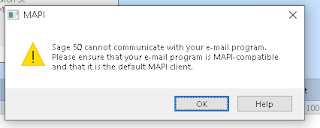
SAGE 50 Email Integration Woes

Image
Sage 50 is a pretty common app in Canada for doing small business accounting. However, one of it's major drawbacks is really poor email integration. I think they've improved it somewhat in recent versions, but there is a MAPI dependency. If you install the 64-bit version of Office, then Sage 50 will not be able to use Outlook to send messages. Now that 64-bit Office is the default for Office 365, you need to watch for that as step one. However, yesterday, on a new install of Sage 50, it wasn't working even with the 32-bit version of Outlook. We got the error: Sage 50 cannot communicate with your e-mail program. Please ensure that your email program is MAPI-compatible and that it is the default MAPI client You also need to have Outlook configured as the default mail program. The Mail program in Windows was configured as the default. So, we changed that to Outlook. Still no luck. Same error. The final fix for me was adding a registry key. According to a few people in discus...

Visual Studio 2017 TFS Client - Clear Cached Creds

This one is just a note for me. To clear cached credentials in TFS 2017 browse to C:\Users\ \AppData\Roaming\Microsoft\VisualStudio\15.0_ed299a44\Team Explorer and delete the TeamExplorer.config file. You will then be prompted for credentials next time you start the TFS client.