Posts

Hyper-V SCSI Controller Error
Image
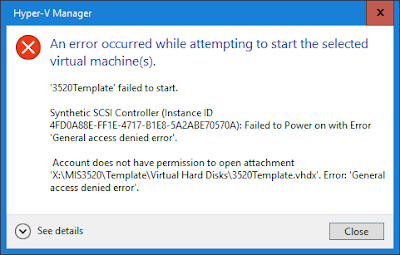
I recently upgraded storage on my Hyper-V server that hosts all of my virtual machines to SSD drives. As part of this, I got lazy for some of the VMs and copied the files manually from drive to drive by using File Explorer rather than moving the VM storage by using Hyper-V Manager. After the disk reconfiguration was done, I got this error for the VMs where I had simply copied the data. Synthetic SCSI Controller (Instance ID GUID) : Failed to Power on with Error 'General access denied error'. Account does not have permission to open attachment ' PathToVirtualDisk '. Error: 'General access denied error'. This is a permissions error indicating that the VM doesn't have access to it's own virtual hard disk. As part of my file copying, the VM level permissions were lost. You can see in the screenshot below that only System, Administrators, and Users have permissions. Normally, you should also see permissions for a GUID that represents the VM with Full control....

Set PowerShell prompt text

I have an annoying issue where I'm storing scripts in a path so long that it makes it awkward to work at the PowerShell prompt. Almost everything I do is wrapping onto the next line. So, to set the prompt to static text that doesn't include the path, use the following command: function prompt {"PS> "} If I'm working with PowerShell prompts connected to different Office 365 tenants, I'll put in text that identifies the tenant. If you do need to view the current directory, you can use Get-Location or $pwd .

Unable to add drive to storage pool

Image
I bought some new SSD drives for my test server that I run VMs on. The number of disks the system could handle was maxed out. So, I needed to shuffle around some data as part of the installation process. During my shuffling, I temporarily added two of the SSD drives and used them as normal drives (not in a storage pool). Later, I deleted the data from those drives and wanted to create a new storage pool with those two drives. However, I found that when I ran the wizard to create the new storage pool, the drives were missing (not listed). They were also not listed in the primordial pool. Using Server Manager, I tried: removing volumes resetting the drives reinitializing the drives taking the drives offline and online changing between GPT and MBR I saw some web site references to drives attached to RAID cards having duplicate identifiers, but mine were attached directly to the SATA interface and had unique identifiers. However, when I ran Get-PhysicalDisk , I noticed that the drives had ...

Outlook Encryption Type Error with Office 365

Image
Office 365 allows you to send email via SMTP based on user authentication. This is commonly used in conjunction with POP or IMAP clients. Where POP or IMAP is used for reading messages and SMTP is used to send the messages. This might also be used by applications and multi-function devices that need to send email. To send SMTP messages through Office 365, you use the following settings: Server: smtp.office365.com User name: UPN of mailbox Outgoing SMTP server port: 587 Encryption type: TLS (STARTTLS in recent versions of Outlook) If you select the wrong encryption type then Outlook will fail to authenticate. For example, if you select the encryption type as SSL/TLS You get the following error which indicates: "Your server does not support the connection encryption type you have specified." It's pretty rare to run into this error because most of the time, you'll be using autodiscover to configure Outlook and use the web-based protocols. However, you might run into this...

Querying IP Addresses for EOP using PowerShell

There is always a desire to lock down the communication for Exchange hybrid servers. If you want to lock down a receive connector in your on-premises Exchange for communication with Exchange Online, there is a published list of IP addresses: https://docs.microsoft.com/en-us/office365/enterprise/urls-and-ip-address-ranges The only IP addresses on that web page that are relevant for a receive connector those for Exchange online and TCP port 25. These are the IP address for Exchange Online Protection (EOP). To simplify automated configuration, Microsoft also makes these IP addresses available in XML format downloadable directly from Microsoft. You can download this using PowerShell. [xml]$xml = invoke-webrequest -uri https://go.microsoft.com/fwlink/?LinkId=533185 Once you have downloaded the xml file, you can extract just the IP addresses for Exchange Online Protection. $EopIP = (($xml.products.product | Where-Object name -eq "eop").addresslist | Where-Object type -eq "ipv4...

Unable to Enable MailUser

It's rare, but occasionally I run into a need to edit Exchange attributes on user mailboxes manually. Last week I had a situation where a user account had no Exchange mailbox, but did have some Exchange attributes populated. This left me in a scenario where running Enable-MailUser failed for the user accounts. For some of the accounts, blanking out the HomeMDB attribute was sufficient. However, for two accounts, even after blanking out HomeMDB it didn't work. When I ran Get-User (the Exchange cmdlet) it reported back that the account was already a MailUser. However, if I ran Get-MailUser I got an error back indicating that: "The operation couldn't be performed because object 'username' couldn't be found on 'servername'". The fix for these two user accounts was to blank out the two additional attributes: msExchRecipientDisplayType msExchRecipientTypeDetails Once those two attributes were cleared, I was able to use Enable-MailUser as expected. Ad...

Hybrid Configuration Wizard not Starting

I think this is something to do with security permissions, but when I click a link to install the hybrid wizard all I see is a flicker scanning file and then nothing. I tried adding a few site to the trusted sites list. You can download it directly here: https://mshrcstorageprod.blob.core.windows.net/o365exchangehybrid/HybridSetup.exe I'm putting the above link in my blog primarily so I remember where it is. I got this link from the following blog post. https://jaapwesselius.com/2018/06/18/hybrid-configuration-wizard-wont-start-on-windows-2016/