Posts

Hybrid Configuration Wizard not Starting

I think this is something to do with security permissions, but when I click a link to install the hybrid wizard all I see is a flicker scanning file and then nothing. I tried adding a few site to the trusted sites list. You can download it directly here: https://mshrcstorageprod.blob.core.windows.net/o365exchangehybrid/HybridSetup.exe I'm putting the above link in my blog primarily so I remember where it is. I got this link from the following blog post. https://jaapwesselius.com/2018/06/18/hybrid-configuration-wizard-wont-start-on-windows-2016/
OneDrive Stops Syncing - Insider Preview

Image
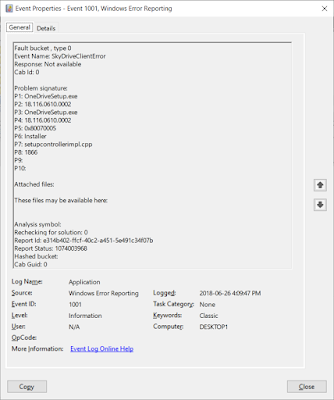
On my laptop, I run Windows 10 Pro Insider Preview current build 17692.1000. I am guessing that my OneDrive issue was related to that. It seemed to happen after a recent update, but I'm not 100% sure. Here were my symptoms: No errors presented in user interface (that is, I didn't know it was broken) Worked on my laptop for a couple of days Attempted to open file from my desktop and got old version  Looking back at the laptop, I could see: OneDrive icons in notification area were gone Attempting to run OneDrive from the Start menu indicated that OneDrive.exe was missing. OneDrive status was blank when viewing files in File Explorer.  Some random searching came up with: Modifying Group Policy settings to allow sync Failed - because it wasn't even running! Run OneDriveSetup.exe from C:\Windows\SysWOW64 Failed - error indicated a newer version was installed Run OneDrive.exe from %LocalAppData%\Microsoft\OneDrive Failed - file was not present However, at this point, in %LocalApp...

Bye Bye FRS

As of build 1709 (that is September 2017), Windows Server 2016 does not support using FRS (File Replication Service) for the replication of SYSVOL data on domain controllers. Some of you are saying: "Man, that's old. Who uses that anymore?" Well, anyone that never bothered to update which is probably most small and even mid-sized businesses who have been updating to a new OS version over the years, but didn't realize they had a choice for SYSVOL replication. The good news is that the update is really easy to do. The steps are as follows: Run dfsrmig /setglobalstate 1 Wait until dfsrmig /getmigrationstate says all domain controllers have updated to state prepared Run dfsrmig /setglobalstate 2 Wait until dfsrmig /getmigrationstate says all domain controllers have updated to state redirected Run dfsrmig /setglobalstate 3 Wait until dfsrmig /getmigrationstate says all domain controllers have updated to state eliminated A very nice writeup for this process with screenshots...

Expired Microsoft Exchange Server Auth Certificate

Image
When you install your first Exchange Server 2013 or Exchange Server 2016 server, a certificate with the friendly name Microsoft Exchange Server Auth Certificate is created. This certificate is self-signed and used for OAuth authentication between applications such as Exchange Server and SharePoint. However, it is also used for hybrid deployments between on-premises Exchange Server and Exchange Online. This certificate is unique because it is installed on all of your Exchange servers. The subject for the certificate is "CN=Microsoft Exchange Server Auth Certificate" and does not contain any SAN names with references to specific servers. It also has a 5-year lifetime. Which is just long enough for everyone to forget about it. I suspect that this certificate is due to expire in many organizations soon. Today I got a call from an organization with the following symptoms: Outlook clients were slow to start Outlook clients were not displaying the user's calendar Outlook clients...

Windows Update 0x800705b4 (Windows Server 2016)

Image
While setting up a new server running Windows Server 2016, I had the install of the latest cumulative update (May 2018) failing with error code 0x800705b4. When I searched about this error there were a lot of articles describing how to reset Windows Update and potentially solve this issue. Most of those pertained to Windows 10. For Windows Server 2016, I found a quick and easy solution. Download and install the update by using sconfig instead. Apparently sconfig uses a different process for installing updates than the graphical interface. First, open a PowerShell prompt or command prompt as Administrator: Select Option 6 to download and install updates. This opens another window: Select whether you want to list all updates or just recommended updates. And then select which updates you want to install. After installation, you'll be prompted to restart just like the standard update process.

Using Saved Credentials with PowerShell Scripts

Most of the time in a Windows environment, a Windows PowerShell script runs in the security context of the user account that is running it. If you have a scheduled task that runs a PowerShell script then you can specify a user account (service account) that is used to run the task. The service account needs to be assigned the necessary permissions to perform any actions in the script. In some cases, you need to script to access remote resources and sign in. For example, if you have a scheduled task that pulls reporting information from Office 365. PowerShell has a method for storing encrypted credentials that can only be accessed the user account that stored them. The code below prompts you for a credential and then stored is encrypted in an XML file. $credential = Get-Credential $credential | Export-CliXml D:\credential.xml To retrieve the credential and using it within a script, you read it from the XML file: $credential = Import-CliXml D:\credential.xml If you created the XML file w...

Front Panel Mic Input Generates Static

I recently learned that many computers suffer from high levels of static when using the microphone input on the front of the computer. My computer certainly has that issue, but I didn't realize it was  common. The static is caused by interference from signals on other cables. The front microphone connector is connected to your mother board by a long thin unshielded cable. So, there are plenty of power cables for devices such as hard drives or USB that can cause interference. On my computer I was able to get rid of the static by unplugging the front USB ports from my mother board. However, that was very annoying when I wanted to use USB devices. My laptop doesn't have the static issue for the microphone. I'm assuming that's because the connector is directly on the motherboard like the back connector on my computer. The back mic port on my computer also does not have static. However, it's awkward to access the rear ports. The fix for my old headset was to buy an ine...