Posts

Script to Create Migration Batches

Migration batches are a nice feature introduced in Exchange 2013 for managing mailbox moves. In general they work pretty well, but it can be a bit awkward to work with batches in large organizations. The graphical interface only displays 500 mailboxes at a time and this can be limiting. To get the batches exactly as you want them, you often end up exporting a list of mailboxes to a CSV file and then cutting that down into batches. You can create a batch by importing a CSV file. To simplify this process, I've created a script that takes all the mailboxes from a list of source databases and generates the CSV files in batch sizes that you specify. For example, you can use both Admin1DB and Admin2DB as your source databases. If you specify a batch size of 200 mailboxes, then you'll get CSV files with 200 mailboxes except for the final CSV which has the left overs. The script can also automatically create the migration batches if you turn that option on. In the script, you can speci...
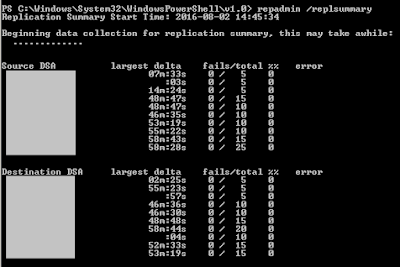
Interpreting RepAdmin.exe /ReplSummary

Image
One of the basic tasks you can do to verify Active Directory replication health is to run RepAdmin.exe /ReplSummary. The question becomes, what exactly do the results mean? If you’re looking for a quick analysis, here it is. With no fails and all largest deltas less than 1 hour, you’re all good. Now, for a more detailed look… Total is the number of replication connections that a domain controller has with other domain controllers. The number of connections is probably higher than you expect because a separate connection is created for each Active Directory partition that’s being replicated. Most of the time you will have 5 per domain controller (domain, configuration, schema, DomainDnsZones, ForestDnsZones). Fails is the number of connections that are not replicating properly. The number of fails should be zero. Largest delta is where some of the confusion comes in. This is the longest period of time that a connection has not been used between two domain controllers. So, if a domain co...

Update Mount-ADDatabase for PowerShell v2

I'm working on some Active Directory (AD) disaster recovery projects right now and one of the recovery methods we're implementing is AD snapshots. With AD snapshots, you have a copy of your AD data to identify and recover from accidental changes. The client I'm working with has Windows 2008 R2 with PowerShell 2.0 for their domain controllers. PowerShell is my preferred method for automating anything at this point but AD snapshots don't have any PowerShell cmdlets. Fortunately Ashley McGlone, a Microsoft PFE, has created some PowerShell functions that help you manage and use AD snapshots. One of the coolest things in there is a function (Repair-ADAttribute) that lets you pull attributes from the snapshot and apply them to the same object in the production AD. You can read more about these functions and download them from these two locations: https://blogs.technet.microsoft.com/ashleymcglone/2014/04/24/oh-snap-active-directory-attribute-recovery-with-powershell/ https://g...

Finding the User or Group Name from a SID

I'm working on project where we needed to set AD security permissions in a test environment based on the permission based on production. When I generated a report of AD permissions that had been applied, several of the entries came back with SID numbers instead of user or group names. Typically this means that the user or group has been deleted, but I wanted to confirm. I wanted to take the SID and identify the user or group account that was associated with it. After a quick search I found a few examples that looked similar to this: $objSID = New-Object System.Security.Principal.SecurityIdentifier("S-1-5-21-1454471165-1004335555-1606985555-5555") $objUser = $objSID.Translate([System.Security.Principal.NTAccount]) $objUser.Value Above example taken from: https://technet.microsoft.com/en-us/library/ff730940.aspx It seemed to me that there had to be an easier way using the ActiveDirectory module for PowerShell which isn't used by these examples. Good news, there is...

Finding PCs Infected with WORM_ZLADER.B

A virus has recently been making the rounds that propagates by renaming folders and storing an executable file in a Recycle Bin folder. Just today we saw this on some shared folders. Here is a link with more info about the virus: http://www.trendmicro.com/vinfo/us/threat-encyclopedia/malware/worm_zlader.b So, we can identify that someone is infected by finding the $Recycle.Bin folders in the shares. But we need to track down where this came from. To do that we want to see the owner of the $Recycle.Bin folder because that is the person that created it. You can't get the owner of the $Recycle.Bin folder by using Windows Explorer because Explorer treats this as a special folder type and limits what you can see. However, you can find the owner by using Get-ACL in PowerShell. On a large file server with many shares, it's useful to scan the whole server to verify the extent of the infection. The script below starts in the current directory, finds all of the Recycle.Bin folders, displ...

June 2016 Security Update Breaks Group Policy

So, this was a thing back in the middle of June and I missed it at the time. Looking back there are a few articles about it, but I just ran into this with a client (happily, before the update was applied) and I think it's worth raising awareness of. In some security updates for Vista and later released on June 14, 2016 the process for Group Policy object (GPO) downloading has been changed. To make the download process more secure, the computer account is now responsible for downloading all GPOs. In the past, the user account could download the GPOs also. The result of this change is that any computer that is downloading GPOs needs to have Read access to the GPO. The computer accounts do not need Apply permission, only Read is required. By default the Authenticated Users group has Read and Apply permission for all GPOs. The Authenticated Users group includes all users and all computer accounts. So, if you haven't changed this, then you'll have no issues when these security u...

A Reason To Use Preauthentication with Exchange

Those that are really paranoid about security (and I don't mean that in a bad way) have always like the idea of pre-authentication in a reverse proxy for Exchange server. When you implement pre-authentication at the reverse proxy, only requests from authenticated users ever get to the Exchange server. This sounds great, but I think from a practical perspective, it doesn't buy you much. It also adds significant complexity. Even with vendor support, getting pre-authentication going always seems to be a hassle. Now, if you want to implement two factor authentication for Outlook on the web/OWA, then pre-authentication is a good point to do that. Most vendors have support for adding two factor authentication. For my customers, this is seldom a concern. Recently though I ran into an issue with account lockouts caused by repeated password attacks on OWA. In this case, the user account is locked and the user can't work. There is no simple solution for this without pre-authenticatio...