Posts

Whitelist Domains for Exchange 2010 Content Filter

Our standard antispam solution for clients is Symantec Mail Security. The main benefit of this software is a very low number of false positives. However, we've been having issues at a few clients where more spam gets through than they'd like. For these clients, we've added the built-in Exchange 2010 content filtering as another layer. With the Exchange 2010 content filter, we've run into issues where some domains are not able send pdf attachments. It seems that most of these senders are hosting their domains using Google mail where you can't blame the content filter for being a bit overly sensitive. To resolve this, we add the domain to the whitelist for the content filter with the following command: Set-ContentFilterConfig -BypassedSenderDomains "domain.com","domain.org" When you use this command, it overwrites the existing list of domains. If this is a long list, rather than risk making a typo, you can use these few commands to add a new domain...

Critical Update for Windows Web Servers

Image
Most of the security updates released by Microsoft fall in the category of apply them soon. This week Microsoft released an update that falls in the category of apply NOW! There is a flaw in http.sys for Windows Server 2008 R2 and later that allows a malformed packet to crash your server and perhaps remotely execute code. Since the patch was released Tuesday, the details of the flaw are widely known and trivial to implement. This means that anyone that can access your web server can crash it at will. Two common scenarios I work with that are cause for concern: Exchange servers . Exchange servers use the Windows web server (IIS) to provide services. This means that your Exchange servers are vulnerable. Small Business Server . Organizations with SBS typically provide both remote access and Exchange web services. Both done with IIS and vulnerable to this flaw. Best practice is install the patch (which requires a restart) from here: https://technet.microsoft.com/library/security/MS15-034 I...

Disk2VHD for Dynamic Disks

I was virtualizing an old server for a customer today and ran into an issue I've never had before. The server has a C: drive for the operating systems and a D: drive for data. Like I've done before, we used Disk2VHD to perform the conversion. After creating the virtual machine and starting it, the D: drive was showing as Dynamic and Offline. So, it appears that the D: drive was a dynamic disk rather than a basic disk. I suspect that at some point it was configured to use mirroring functionality in Windows which requires dynamic disks. Ok, fair enough. How do we properly import this disk? According to several searches, I should be able to reactivate the disk. However, this didn't work in my case. At this point, I'm a bit annoyed. An obvious solution is to do a simple file copy from the old D: drive in the original server, but I'm doing this conversion remotely and have already shut down the original server. I would need to abort the conversion for the weekend if I ca...

Free Online Technical Conference

On May 14-15, 2015 the MVP Virtual Conference is free online for all that register. The sessions are open to anyone, but presented by Microsoft MVPs. It looks pretty cool with topics such as: Migrating to Office 365 Windows Azure Ransomeware - prevention and recovery Check it out here: http://mvp.microsoft.com/en-us/virtualconference.aspx

IE Compatibility View Woes

Image
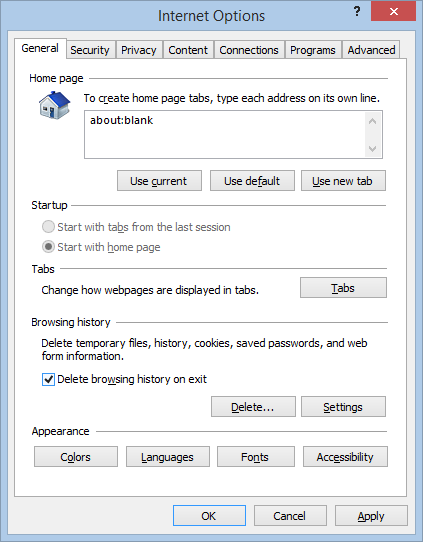
Many organizations have web-based applications that require Compatibility View in Internet Explorer to work properly. In cases where there are only a few computer or users, it's quite easy to add a specific web site to the list of sites for Compatibility View from the IE user interface. We ran into a hiccup recently where several computers were not keeping a site in the Compatibility View list. You could add the site, but when you restarted Internet Explorer, it was gone. This was caused because the option Delete browsing history on exit was enabled. This is a known issue and has been known since IE 8. This client is using IE 11. Internet Explorer - Internet Options To accommodate having this option on, I pushed out the Compatibility View site through Group Policy. Which is probably what I should have done before. The Group Policy setting exists for both Computer configuration and User configuration in: Policies\Administrative Templates\Windows Components\Internet Explorer\Compat...

Throttling Hyper-V Replication Traffic

We have a client with two physical locations and a 100 Mbps link between them. For disaster recovery purposes, we are using Hyper-V replication between the two sites. Recently we made a disk change to one of the VMs that forced us to delete and recreate replication for one of the VMs. Unfortunately it was the VM with 650 GB of data. Because replicating that amount of data in the best case will take about 13 hours over the WAN link, we need to control the replication and prevent it from interfering with normal business. Hyper-V does not have any built in functionality to control bandwidth for replication traffic. Fortunately Windows Server 2012 R2 has quality of service (QoS) functionality built into the operating system. In my case, the receiving server is using port 443 to receive the data. On the source server, vmms.exe is replicating the data to the destination server. I created policy that limited traffic to 50 Mbps from vmms.exe to port 443 with the following command: New-NetQosPo...

Exchange 2013 Is Filling My C: Drive

So, Exchange 2013 does a few things differently than previous versions of Exchange. If you are not careful about how you allocate your disk space, you'll end up constantly wondering why the C: drive is filling up. And if your monitoring isn't up to snuff, you'll notice C: drive is filling up because mail flow almost stops due to back pressure. If you are using direct attached storage for your C: drive as Microsoft suggests, then you likely have a fairly large C: drive. Something like 300GB or more. If you have a C: drive that large you're likely OK and don't need to worry about it. On the other hand, if you have your Exchange server using a SAN and you tried to keep your C: drive to 80GB because that SAN space is expensive, you will have issues. There are three common things can use up the C: drive: Internet Information Services (IIS) logs Exchange Server diagnostic logs Transport queues IIS Logs Exchange Server has a variety of web-based services such as Outlook We...