Posts

Forward Messages and Leave in Mailbox
Image
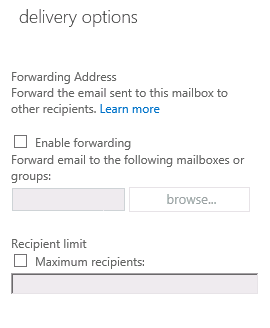
One of the fairly common tasks for Exchange administrators is to configure forwarding on a mailbox. Previous versions of Exchange gave you the option to leave a copy of forwarded messages in the mailbox and the option was accessible in the graphical administration tools. As you can see in the screenshot below, for some reason in Exchange 2013 this option was left out of the graphical/web interface. When you enable forwarding in the web interface, by default the message will not be left in the recipient mailbox. However, the option is still there if you use PowerShell. The Set-Mailbox cmdlet is your friend: Set-Mailbox -Identity " user " -ForwardingAddress " otheruser@domain.com " -DeliverToMailboxAndForward $true
Microsoft Exchange Conference 2014 - Sessions Online

I was too busy to attend the Microsoft Exchange Conference this year in Austin. Fortunately for us they recorded most (if not all) of the breakout sessions and made them available on Channel 9. It looks like over 50 session are online and available for free. You can see them here: http://channel9.msdn.com/events/mec/2014

New Pagefile Sizing for Exchange 2013

Over the last few years, memory has become increasingly inexpensive. As a result, for scalability, you can often see Exchange servers with 64GB or 128GB of RAM. In the past, Microsoft's guidance on pagefile size has been system memory plus some amount to allow for the contents of memory to be written to disk in the event of a crash. Basically, this is for troubleshooting information. For Exchange 2013, the guidance has been RAM+10MB. Unfortunately this means that a large amount of disk space is used for that pagefile with little benefit because it's not typically used much. Certainly not the full RAM of the system. I've been arguing for a long time that unless you are troubleshooting bluescreen events with Microsoft support, there is no need for this large of a pagefile for Exchange or regular Windows servers. As of Exchange 2013 SP1 the new guidance is to max out the pagefile at 32GB+10MB. Apparently Microsoft has been doing this internally for some time. For more informat...

Remove Exchange 2007 Public Folder Database After Exchange 2013 Migration

Image
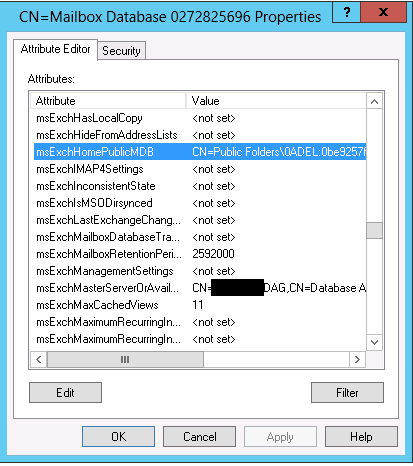
After I was done performing a migration from Exchange 2007 to Exchange 2013, I received the following error when trying to remove the public folder database from the Exchange 2007  EMC: Object is read only because ti was created by a furture version of Exchange: 0.10 (14.0.100.0). Current supported version is 0.1 (8.0.535.0). Ok. No problem. I'll just remove this from the Exchange 2013 side. However, I found that shell in Exchange 2013 does not have the Remove-PublicFolderDatabase cmdlet. The only fix I found was to remove the public folder database by using ADSI Edit. You can find the public folder database in the following path in ADSI Edit: Configuration\Services\Microsoft Exchange\ OrganizationName \Administrative Groups\Exchange Administrative Group (FYDIBOHF23SPDLT)\Servers\ ServerName \InformationStore\ StorageGroupName \ PublicFolderDBName  After removing the public folder object, I could delete the storage group and uninstall Exchange 2007. At this point, in the event...

Find Unused Exchange Mailboxes

Every once in a while you need to identify mailboxes that are no longer in use. This PowerShell command will find any mailbox where no one has logged on to the mailbox for 60 days. Get-Mailbox | Get-MailboxStatistics | Where-Object {$_.LastLogonTime -lt (Get-Date).AddDays(-60)} You can use this information to further investigate whether these mailboxes are required. If the LastLogonTime is $null (blank) it means that the user has never logged on. This is normal for shared mailboxes and resource mailboxes.

Samsung Network Printer Won't Wake

Yesterday I installed a new CLP-415NW printer for a client. Install was easy and the client loved the print quality. But we ran into one snag.... When the printer went to sleep after 5 minutes (default setting) it wouldn't automatically wake up when you sent a print job. The printer appeared offline and you needed to physically press a button on the printer to wake it up. When it was asleep, you couldn't print to it, you couldn't access the web interface, and you couldn't even ping it. I figured this was crazy that there has to be an easy solution for it. So, I started looking at settings on the printer and nothing seemed to fit. I tinkered with when sleep occurred, but had no success. I emailed Samsung support and they provided the following link, which described how to disable bidirectional support in the network port. This had no effect. http://tinyurl.com/p5xcmhr Then today I spent a frustrating hour and a half on a web chat with Samsung support. I got the following...

Download OEM Installation Files for Office

Many of our smaller customers use OEM versions of Microsoft Office. Dell has not been shipping installation media for these versions. Office has been included in the image from Dell. So, what to do when you want to reinstall the OS? Go to this web site to download OEM installations of Microsoft that you can use for reinstall. It includes downloads for Office 2007, Office 2010, and Office 2013: http://office.microsoft.com/en-ca/products/download-back-up-restore-microsoft-office-products-FX103427465.aspx