Posts

Remove Exchange 2007 Public Folder Database After Exchange 2013 Migration
Image
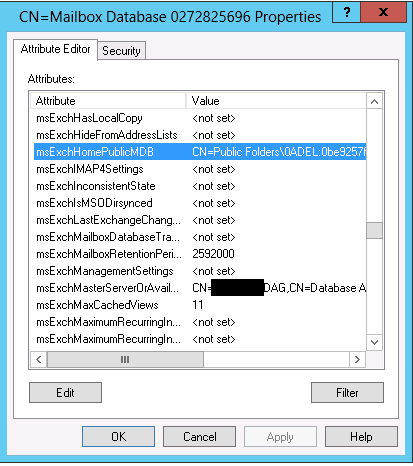
After I was done performing a migration from Exchange 2007 to Exchange 2013, I received the following error when trying to remove the public folder database from the Exchange 2007  EMC: Object is read only because ti was created by a furture version of Exchange: 0.10 (14.0.100.0). Current supported version is 0.1 (8.0.535.0). Ok. No problem. I'll just remove this from the Exchange 2013 side. However, I found that shell in Exchange 2013 does not have the Remove-PublicFolderDatabase cmdlet. The only fix I found was to remove the public folder database by using ADSI Edit. You can find the public folder database in the following path in ADSI Edit: Configuration\Services\Microsoft Exchange\ OrganizationName \Administrative Groups\Exchange Administrative Group (FYDIBOHF23SPDLT)\Servers\ ServerName \InformationStore\ StorageGroupName \ PublicFolderDBName  After removing the public folder object, I could delete the storage group and uninstall Exchange 2007. At this point, in the event...

Find Unused Exchange Mailboxes

Every once in a while you need to identify mailboxes that are no longer in use. This PowerShell command will find any mailbox where no one has logged on to the mailbox for 60 days. Get-Mailbox | Get-MailboxStatistics | Where-Object {$_.LastLogonTime -lt (Get-Date).AddDays(-60)} You can use this information to further investigate whether these mailboxes are required. If the LastLogonTime is $null (blank) it means that the user has never logged on. This is normal for shared mailboxes and resource mailboxes.

Samsung Network Printer Won't Wake

Yesterday I installed a new CLP-415NW printer for a client. Install was easy and the client loved the print quality. But we ran into one snag.... When the printer went to sleep after 5 minutes (default setting) it wouldn't automatically wake up when you sent a print job. The printer appeared offline and you needed to physically press a button on the printer to wake it up. When it was asleep, you couldn't print to it, you couldn't access the web interface, and you couldn't even ping it. I figured this was crazy that there has to be an easy solution for it. So, I started looking at settings on the printer and nothing seemed to fit. I tinkered with when sleep occurred, but had no success. I emailed Samsung support and they provided the following link, which described how to disable bidirectional support in the network port. This had no effect. http://tinyurl.com/p5xcmhr Then today I spent a frustrating hour and a half on a web chat with Samsung support. I got the following...

Download OEM Installation Files for Office

Many of our smaller customers use OEM versions of Microsoft Office. Dell has not been shipping installation media for these versions. Office has been included in the image from Dell. So, what to do when you want to reinstall the OS? Go to this web site to download OEM installations of Microsoft that you can use for reinstall. It includes downloads for Office 2007, Office 2010, and Office 2013: http://office.microsoft.com/en-ca/products/download-back-up-restore-microsoft-office-products-FX103427465.aspx

SSD + Dedup in Win 2012 - WOW!

I do a lot of work with Hyper-V virtual machines in a test environment. My Hyper-V host is a white box kludged together cheaply, but with reasonable hardware. The VMs that are used for Microsoft courses use base drives for the core OS and then differencing drives for each individual VM. The bouncing back and forth between the base drive and the differencing drive tends to drag down performance. In addition, I often use snapshots to give me a backout point when developing labs. Which reduces performance even more. I've got the storage system setup as four 7200 RPM SATA drives in a RAID 10 array using the Intel Storage Technology enterprise that is built into the motherboard. This gives far better performance than a single drive, but still not enough when I'm running many VMs. Storage speed is the bottle neck in this system. Today I bought a Kingston 240 GB HyperX SSD drive to improve performance. Since the drive is not very large, I though I'd start by moving only the base d...

Free Online Hyper-V Training

I work with Hyper-V a lot for Microsoft training and we've starting to use it as our standard virtualization platform for clients. I've seen a lot of improvements in it since it was first introduced and honestly think that for smaller organizations it's easier to work with than VMware. For larger organizations, I think it's a contender. One of the biggest impediments to implementation is knowledge. Microsoft is making online training for Hyper-V in Windows Server 2013 R2 available for free. They're also kicking in a certification exam. Check it out: http://www.virtualizationsquared.com/

Windows Live Mail Not Forwarding Embedded Pictures

I recently ran into a computer using Windows Live Mail in conjunction with AOL. This resulted in some emails with embedded pictures not forwarding. It generated a warning about this when you went to send. What seemed to fix it was disabling the option in Windows Live Mail to convert emails with pictures to picture emails. However, this conversion happened when the messages were received. For existing emails that have already been converted, right-click and forward as attachment seemed to do the trick. To disable picture emails: File > Options > Mail > Compose > Convert messages to photo e-mail when adding photos