Posts

Paging File Error in Hyper-V Virtual Machine

I'm experimenting with Hyperoo Backup software for Hyper-V virtual machines at some clients. Hyperoo analyzes the virtual disk files and sends changes to a backup copy. I rather like it so far. To minimize the changes inside the VM disks, I've be moving the paging file to a separate virtual disk. We can then exclude this disk from the backup process. One one VM (and only one) we got the following error: Windows created a temporary paging file on your computer because of a problem that occurred with your paging file configuration when you started your computer. The total paging file size for all disk drives may be somewhat larger than the size you specified. It turns out that on this particular virtual machine, we needed a total of four virtual disks. This combined with the virtual DVD drive meant that we needed to use SCSI disks in the VM. In a Hyper-V VM, you cannot place the paging file on a virtual hard drive on the virtual SCSI bus. The virtual SCSI bus is not available ...
Cached Credentials for a Mac using AD

When you have a laptop computer, you want to be able to use the same logon credentials when you are in the office as when you are on the road. With a Windows-based laptop, this is accomplished by cached credentials. The cached credentials on a Windows computer are automatically created the first time you log on. A network administrator can disable this, but it is enabled by default. On a Mac that logs on using AD credentials, you can get similar functionality by enabling the option "Create mobile account at  login" in the Directory Utility that you use to configure AD connectivity for the MAC. When this option is enabled, the local mobile account is enable the first time the user logs on by using AD credentials. Many times, no one thinks of this option until after the user has already logged on. In such a case, you need to log on as root and manually create the mobile account by using createmobileaccount . It is located in /System/Library/CoreServices/ManagedClient.app/Conten...

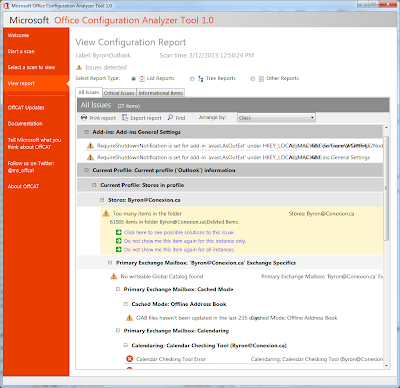
New Tool for Analyzing Outlook Configuration

Image
Microsoft has recently release the Microsoft Office Configuration Analyzer Tool. This tool scans the configuration of locally installed Microsoft Office components, including Outlook to identify potential issues. This can be useful for technicians troubleshooting Outlook related problems for users. You can download the tool here: http://www.microsoft.com/en-us/download/details.aspx?id=36852 If you run the tool only for Outlook, it takes 2-3 minutes to run and the provides a report. I was surprised to see that my installation of Outlook has a few issued that need to be investigated. Apparently 60,000 deleted items is considered a potential issue.

TurboTax 2012 Won't Run

When attempting to run TurboTax 2012, the application would close with no error message. When the application started, it identified the application as untrusted, but that is normal for this application and just means that Intuit for some reason was too cheap to digitally sign their application. After looking in the Application log, I found this: Event 1000, Application Error Faulting application path: C:\Program Files (x86)\TurboTax 2012\tt2012.exe Faulting module path: C:\Program Files (x86)\Intel\iCLS Client\LIBEAY32.dll It seemed odd to me that TurboTax was using a DLL from another folder. It turns out that LIBEAY32.dll is a generic dll used for cryptography and can come with several products. The iCLS Client is separate software from Intel that has nothing to do with TurboTax. So, I made a guess that TurboTax installed it's own version of LIBEAY32.dll in an alternate location and that it's using the wrong one. My fix was to rename the LIBEAY32.dll in the iCLS Client folde...

Unable to Install FileOpen Client

One of the staff at a client is taking a course that uses the FileOpen client for DRM on PDF documents that are distributed as part of the course. Unfortunately, he was having issues installing the FileOpen client on his computer. It was Windows 7 Pro 64-bit and he has full Administrative permissions on the local computer. He had even tried disabling user account control with no success. The error during installation was: Service 'FileOpen Manager Service' (FileOpenManagerService) could not be installed. Verify that you have sufficient privileges to install system services. Support at FileOpen responded very quickly with the following: Please run this program: http://plugin.fileopen.com/tools/FileOpenUninstallTool.exe Then install via this program: http://plugin.fileopen.com/new/current/FileOpenInstaller.exe This resolved the problem and FileOpen installed with no issues.

Exchange 2010 Mailbox Move Hung at 95%

I'm doing a migration from Exchange 2007 to Exchange 2010 has run into an issue with some mailboxes hung at the status of "Completing". If you look at the log for the move, it indicates that it is at 95% and getting the final incremental data after the initial move. These moves were hung for a couple of hours in this state. There are several suggestions for fixing this online: Verify that AD permissions are inheriting to the user account. Restart the Exchange Mailbox Replication Service I verified the permissions and restarted the Exchange Mailbox Replication Service with no effect. After restarting this service, there were errors in the mailbox move log about the mailbox already being in the process of being moved and that it could not connect. My thought at this point is to restart services on the Exchange 2007 side to hopefully release those mailboxes When I looked at the application log on the Exchange 2007 server, I noticed that there was an error about the Mailbox S...

Default Gateway 0.0.0.0

Over the last few years we've had several instances of Windows 7 computers having a default gateway of 0.0.0.0 assigned. In all cases, the computers were obtaining an IP address from DHCP. This is a fairly well know issue with several products the use the Bonjour service for some networking services. References I've seen to Bonjour include iTunes and Adobe CS3. However, there are likely to be others. The basic problem is the timing of service startup. If the Bonjour service starts before the networking is initialized, the Bonjour service adds a default gateway of 0.0.0.0 which overrides the default gateway that you eventually get from DHCP. There are several ways to fix this: Update your product. I've found several references online that indicate that the latest versions of the Bonjour service don't have this issue. Disable the Bonjour service. The only downside to this is that it may impact some functionality in the product. Manually remove the default gateway (route d...