Posts

Finding Zeus P2P on Your Network
Image
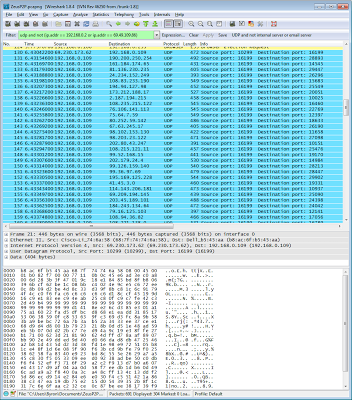
Last week a client got a nasty surprise when their Internet access was blocked by their ISP because the Zeus P2P virus had been detected from their IP address. Because all computers share the same IP address through NAT (network address translation), all of the computers were blocked. All of the computers at this site have up to date commercial antivirus software. But obviously Zeus P2P got past it. I'm noticing that this is becoming quite common. We see viruses getting in all the time through web pages, links in spam messages, and attachments to spam messages. After doing some research, it turns out that Zeus P2P typically communicates with UDP ports 10,000 and up. The best way to find specific network traffic is by using a packet sniffer. However, you can't use a packet sniffer effectively on switched networks unless your switch has a basic level of management capabilities and supports port mirroring. I configured the switch for this company to mirror traffic from the port th...

Goodbye Forefront

I've not been a big user of the Microsoft Forefront products. I've tended to use competing products either in software for antispam/antivirus or hardware for firewalling/reverse proxy. However, Forefront Protection for Exchange seemed to get a fair amount of traction with people that implemented Exchange Edge Transport servers. In September, Microsoft announced that many of the Forefront products are being discontinued. As of December 1, 2012, most cannot even be purchased anymore. See the official announcement here: http://blogs.technet.com/b/server-cloud/archive/2012/09/12/important-changes-to-forefront-product-roadmaps.aspx See an explanation from a former employee here: http://hal2020.com/2012/09/15/goodbye-forefront-it-was-nice-knowing-you/ So, if you were using some of these products, where do you go from here...... Forefront Protection for Exchange. If you are comfortable outsourcing email scanning then you can use Forefront Online Protection for Exchange. The online ser...

VDI Deployment Error About Virtual Switch

Today in class, we were testing out virtual desktop infrastructure deployment (VDI). Microsoft's VDI infrastructure is designed to allow users to have virtual desktops. Due to the restraints of our classroom environment all of the computers were unplugged from the network. As a consequence, in Hyper-V the external network was not up. This resulted in the following error during the creation of a collection: Server computer.domain.com either does not have a virtual switch configured or none of the configured virtual switches have an IP address assigned In our environment the computers all had the same external IP address and could not be reconnected to the network at the same time. The simplest short term solution was to connect each computer to a small switch that had no other connectivity. This brought up the link light on the external NIC and allowed the creation of the collection to complete. This is unlikely to be a concern in any type of real life environment because those w...

Access Denied When Deleting Hyper-V VM Files

I have a test environment setup using Hyper-V. I regularly add and remove virtual machines from this Hyper-V host. When you delete a virtual machine in the Hyper-V Management console, it does not delete the files. You need to delete the files manually afterwards. A significant percentage of the time, I receive an Access Denied message when deleting the VM files. Even though the VM is deleted, I cannot remove the files.The happens because Hyper-V has locked the files. To unlock the files and allow the files to be deleted you can: Restart the Hyper-V host Restart the Hyper-V Virtual Machine Management service on the host

PowerShell 3 breaks Exchange 2007/2010

PowerShell 3.0 is now available for Windows Server 2008 and Windows Server 2008 R2 as an optional update in Windows Management Framework 3.0. Do not install this on your Exchange 2007/2010 servers or any workstations with the management tools for Exchange 2007/2010. Symptoms include the inability to install rollup updates and some cmdlets not functioning properly. The updates to avoid are: KB2506146 KB2506143 For more information, see The Exchange Team Blog:   http://blogs.technet.com/b/exchange/archive/2012/12/14/windows-management-framework-3-0-on-exchange-2007-and-exchange-2010.aspx UPDATE: Feb 11, 2013 Exchange 2010 SP3 has been released and enables support for running on Windows Server 2012. I have not yet tested it, but since Windows Server 2012 has PowerShell v3 installed, this SP should also allow PowerShell v3 to be installed on other versions of Windows Server. http://blogs.technet.com/b/exchange/archive/2013/02/12/released-exchange-server-2010-sp3.aspx UPDATE: Nov 27, 20...

Removing a Virus from Startup with Autoruns

My experience lately has been that many viruses/malware only infect the profile of the user that was logged on at the time of infection. This is due mostly to the security of the operating system and browser which generally limit activity to the user profile. However, even older XP machines with users running as a local administrator benefit when the malware assumes that it needs to infect the user profile rather than system files. If malware is limited to a profile, it makes removal of the malware much easier. Log off as the infected user and log on as a user that is not infected. If the malware is only in the user profile this is just as effective as scanning the hard drive externally from another computer. Today I had the pleasure of dealing with System Progressive Protection. It is very aggressive fake antivirus software. Once it is in the system, you can't run most tools because it blocks them. However, it was limited to the user profile. When I logged on as another user the s...

Configuring Shaw Business POP Accounts

Shaw provides easy to find documentation for their consumer side POP email. The configuration for the business service is a little harder to come by. Configuration information: incoming and outgoing server: mail.shawcable.com username: your email address, including the domain outgoing port: 25 (587 is not supported)